
One panel. Every volume.
HI Volume Mixer puts every speaker, headset, mic, and running app's audio on one clean, always-handy panel — no more digging through Windows' buried volume mixer or juggling apps to get your sound right.
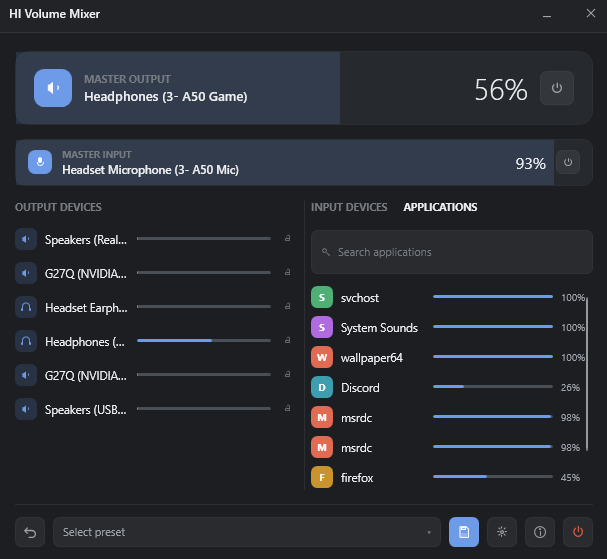
Every device and every app, one slider each
Master output and input cards up top stay in sync with your system volume keys and the Windows flyout. Below, every connected device and every app's audio session gets its own slider — balance Discord against Spotify without alt-tabbing.
01
Per-device control
Individual volume and mute for every speaker, headphone, and microphone connected to your PC — output and input alike.
02
Per-app volume
A dedicated slider for every running app's audio session — Chrome, Spotify, Discord, games, and more — balanced independently.
03
Master volume cards
One-touch master output and input sliders scale every device together, staying perfectly in sync with your system volume keys and the Windows flyout.
04
Presets, saved and named
Save named snapshots of your entire audio setup — devices and apps — and load them back instantly for gaming, streaming, calls, or movie night.
05
One-click undo
Loading a preset reverts in one click, so experimenting with your setup never costs you the one you had before.
06
Global hotkeys
Assign shortcuts to load a preset, mute any device or app, adjust master volume, or show/hide the window — system-wide, even while minimized.
07
Lock devices
Exclude specific devices from presets and undo, so a shared or sensitive input never gets clobbered by accident.
08
Lives in your tray
Stays out of your way as a lightweight tray icon, pops open right where you click it, and automatically matches your Windows light or dark theme.
Real per-app icons
Quick visual identification for every session in the list.
Search apps instantly
Jump straight to one app in a long session list.
Launch at sign-in
Optional — HI Volume Mixer is ready before you are.
Command-line presets
Load a preset from a shortcut or script, for automation.
Single-instance design
Launching again just brings your existing window forward.
Settings that persist
Per-device settings survive restarts, exactly as you left them.
Take control of your sound
Fast, native, and precise — with no admin rights required and no background bloat. Free for personal and non-commercial use.